
Walmart: Shopping & Savings
WalmartShopping
4.7583.02K Reviews
- Version
- 26.40.1
- Installs
- 100.00M
- Age Rating
- Everyone
Screenshots







Our Review of Walmart: Shopping & Savings
 Analysis by Appyee
I tend to notice shopping apps most when a simple task stops being simple: I need to check an item, remember the rest of the list, and decide whether it is worth making a trip. Walmart: Shopping & Savings brings those errands into one place, and I find it most useful when I treat it as a practical way to plan a shop rather than a guarantee that every part of the experience will be effortless. Walmart’s app is free, and its focus spans groceries and everyday purchases as well as a much wider range of shopping.
All-in-One Shopping Experience
First off, let’s talk about how comprehensive this app is. Walmart: Shopping & Savings isn’t just about buying groceries or snagging the latest tech gadgets. It’s like having the entire Walmart store in your pocket! From household essentials to fashion, you name it, they’ve probably got it. And the best part? You can easily filter and search for items, making the whole process super smooth.
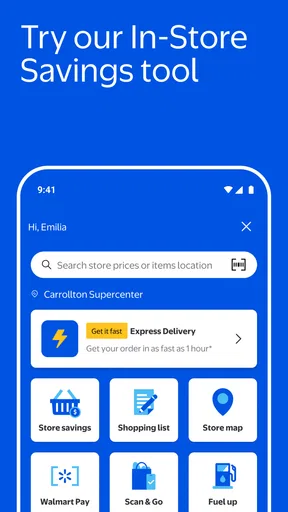
One feature I particularly enjoyed is the barcode scanner. Imagine standing in a store, unsure if you’re getting the best deal. Just whip out your phone, scan the barcode, and voila! You instantly get price comparisons and additional product details. It’s like having a personal shopping assistant!
Convenience at Your Fingertips
We all know that feeling of dread when we realize we’re out of milk or bread. With this app’s easy-to-use interface, you can quickly browse for what you need, add it to your cart, and choose between delivery or curbside pickup. The time-saving aspect of this feature is a game changer. Plus, the app sends you notifications about deals and discounts, ensuring you never miss out on savings.
Another thing that caught my eye is the reorder feature. For those of us who buy the same items regularly, this is a lifesaver. The app keeps track of your purchases, making repeat shopping a breeze. Just a few taps and you’re done!
Seamless User Experience
Now, let’s talk user experience. The app is designed to be intuitive, even for the least tech-savvy among us. Everything is laid out clearly, and the navigation is straightforward. Plus, the sleek design makes browsing a pleasure rather than a chore.
I also appreciate the customer support options available directly through the app. Whether you have a question about an order or need assistance with returns, help is just a tap away. It’s these little touches that make a big difference in user satisfaction.
Where shopping plans can hit a snag
The main friction I watch for is not the act of searching, but the gap between finding an item and being ready to complete the shop. A product can appear in a broad search even when I still need to check the exact size, style, or other details. I slow down at that point and read the item page before adding it, especially for household supplies where a near-match is not necessarily the right replacement.
Grocery shopping also benefits from a quick cart review. I use the search results to build a draft, then look over quantities and familiar product names before choosing how to receive the order. That extra pass is useful when I have added things quickly or searched for several similar products. It is less exciting than browsing, but it helps keep a routine shop from turning into a correction exercise.
Delivery and curbside pickup are convenient choices, but convenience still depends on the practical details of the particular shop. I would not assume that every product, time, or option will suit every situation. If I need an item urgently or have a very specific preference, I check the available choices in the app and decide whether shopping in person is the safer plan.
A setup that avoids avoidable hassle
Before building a large order, I recommend getting comfortable with the basic flow: search for one item, inspect its details, add it to the cart, and see how the app presents the next step. This small test makes it easier to understand the interface before you are relying on it for a full grocery run. Walmart is developed by Walmart, and the app has been around since May 6, 2011; its current version is 26.32.2 and it requires Android 9 or later. It is rated for Everyone.
It is also worth deciding what you want the app to do for you. If the goal is a quick repeat purchase, the reorder option can reduce the work of rebuilding a familiar basket. If the goal is to compare products or plan a mixed shop, search and filters are more useful. I find it helps to start with a short list rather than opening the app without a plan: that keeps browsing from burying the essentials under tempting extras.
Notifications can be useful if I want to hear about deals, but I prefer to think of them as prompts to check rather than instructions to buy. A discount only matters when the product is something I actually need and the details fit my plans. Turning shopping into a constant stream of alerts would be a poor trade for me, so I keep my attention on the cart and the list instead.
Recovering a shop when something goes wrong
If a search seems unhelpful, I try a simpler product name or remove extra descriptive words before assuming the app has failed. Then I check the item details and use the cart as a staging area while I decide whether it is the right choice. This is especially handy for a mixed basket: I can separate the task of finding products from the final decision about pickup or delivery.
When I lose track of a planned purchase, I look at past purchases and use the reorder workflow for the items I buy repeatedly. I still review each selection instead of tapping through on autopilot; routines change, and the previous choice may not be what I need this time. For an order question or a return concern, the app’s customer support options provide a place to start. I would keep the relevant order information nearby so I can explain the issue clearly.
A realistic use for me is the end-of-day kitchen check. I notice that breakfast basics are running low, search for those items, add them alongside a couple of household essentials, and review the basket before choosing a receiving option. The app is particularly helpful when I want to avoid making a separate trip for a short list. If I am already near a store, though, or need to inspect a product personally, a regular in-person visit may be more straightforward.
How it fits among shopping alternatives
Compared with a single-purpose grocery app, Walmart’s appeal is the breadth of shopping in one place: I can think about food and non-food essentials in the same session instead of switching between several retailers. That convenience is strongest when I am already planning to shop at Walmart. A dedicated local grocery service may suit someone whose priority is a specific grocer, while visiting a shop directly is better when choosing items by sight matters more than saving time.
The breadth has a trade-off. A wide catalogue can make the experience feel less focused than an app built only around a weekly food shop, and a large set of choices can take longer to narrow down. I use filters and clear search terms to keep the task manageable. The barcode scanner is most useful to me as a quick check while browsing in person, not as a reason to assume that every alternative or comparison will settle a buying decision on its own.
The app has an average rating of 4.7 from around 7.4 million ratings, with roughly 573,000 written reviews and more than 100 million installs. Those figures suggest it has reached a large audience, but popularity does not tell me whether a particular order will fit someone’s needs. I would judge it by the shopping routine I actually have: repeat essentials, a mixed household list, or occasional browsing are all different tests.
When a different approach makes more sense
I would skip this app if I rarely shop at Walmart, prefer to choose every grocery item in person, or do not want another place to browse and receive shopping notifications. It is also not my first choice when the task is simply to visit a nearby store and pick up one known item; opening an app and arranging a shop can add steps rather than remove them.
If the app is slow or an order choice is unclear, I first check the basics: whether I have entered the right search terms, selected the intended item, and reviewed the cart before proceeding. I also consider whether the issue may be tied to the product or the particular shopping situation instead of treating every snag as an app problem. If the same difficulty persists, I use the support options available in the app rather than repeatedly starting the same action.
For people who want one place to search across groceries and everyday goods, and who are comfortable reviewing their basket before placing an order, this is a practical option. Walmart’s app is free, and its broad reach is reflected in its 100 million-plus installs. I would approach savings as a helpful extra, not the whole reason to use it: a good shop is one that matches the list, timing, and way of receiving the items.
Overall, Walmart: Shopping & Savings offers a useful mix of convenience, variety, and routine-shopping tools. I like it best when I use it deliberately: search with a clear list, check the products, and choose delivery or curbside pickup only when those options work for the errand. It will not replace every store visit or suit every shopping style, but for combining a planned grocery run with everyday essentials, I can see why it has become a regular option for many shoppers.
Privacy and Permissions
See what permissions an app requests and how it handles your data.
- Calendar
- read calendar events plus confidential information, add or modify calendar events and send email to guests without owners' knowledge
- Location
- approximate location (network-based), precise location (GPS and network-based)
- Phone
- read phone status and identity
- Photos/Media/Files
- read the contents of your USB storage, modify or delete the contents of your USB storage
- Storage
- read the contents of your USB storage, modify or delete the contents of your USB storage
- Camera
- take pictures and videos
- Microphone
- record audio
- Wi-Fi connection information
- view Wi-Fi connections
- Device ID & call information
- read phone status and identity
- Other
- view network connections, connect and disconnect from Wi-Fi, full network access, change your audio settings, control Near Field Communication, run at startup, control vibration, prevent device from sleeping
Verdict
Strengths of Walmart: Shopping & Savings
- Wide variety of products available.
- Easy-to-use interface with smooth navigation.
- Convenient online grocery ordering.
- Offers same-day delivery options.
- Provides personalized shopping suggestions.
Limitations of Walmart: Shopping & Savings
- Occasional app crashes and glitches.
- Some users report slow loading times.
- Limited payment options for certain regions.
- Notifications can be overly frequent.
- In-store availability not always accurate.
Other Releases by Walmart
View All
Spark Driver
Business4.0

MyWalmart
Business4.5
Similar Picks in This Category
View All
SHEIN-Shopping Online
Roadget Business PTE. LTD.4.8

Amazon Shopping
Amazon Mobile LLC4.4


Mercado Libre: Compras online
Mercado Libre4.8

Wish: Shop and Save
Wish US Holdings LLC4.7

Alibaba.com - B2B marketplace
Alibaba Mobile4.4
You May Also Like
View All


Frequently Asked Questions
What features does the Walmart app offer?
The Walmart app provides a comprehensive shopping experience, allowing users to browse and purchase a wide range of products, from groceries to electronics. It features easy order tracking, Walmart Pay for seamless checkout, and the ability to create shopping lists. Additionally, users can access exclusive savings and offers through the app.
How does Walmart Pay work within the app?
Walmart Pay is a secure and convenient digital wallet feature within the Walmart app. Users can link their credit or debit cards, and at checkout, simply scan the QR code displayed on the register screen to complete the payment. This feature ensures a fast and efficient checkout process without the need to handle cash or cards.
Can I use the Walmart app for grocery delivery?
Yes, the Walmart app allows users to order groceries for delivery or curbside pickup. Simply select the items needed, choose a delivery or pickup time, and the app will handle the rest. Delivery fees may apply, but users can often find promotions for free or discounted delivery services.
Is the Walmart app available on both Android and iOS devices?
Absolutely, the Walmart app is available for both Android and iOS devices. It can be downloaded from the Google Play Store for Android users and the Apple App Store for iOS users. The app is designed to function seamlessly across both platforms, providing a consistent user experience.
Are there any membership requirements to use the Walmart app?
No membership is required to use the Walmart app. However, users can sign up for a free Walmart account to enhance their shopping experience. An account allows users to save shopping lists, track orders, and receive personalized recommendations. For additional benefits, users may consider enrolling in Walmart+, a subscription service offering free delivery and discounts.
